Reverse Engineering PHP with radare2: A Practical Guide
PHP powers a massive portion of the web. But not all PHP you encounter comes with source code. Whether you’re auditing a third-party package, analyzing obfuscated code, or understanding a legacy system, you need tools that can dig into compiled PHP.
radare2 is one of the most powerful reverse-engineering frameworks available, and it handles PHP bytecode just as well as binary executables. This guide walks you through the fundamentals of using radare2 to understand, analyze, and reverse engineer PHP applications.
Why Reverse Engineer PHP?
Before diving into tools, let’s be clear on why this matters:
- Security audits: You don’t always have the source. Third-party packages, plugins, and commercial tools may be obfuscated or closed-source.
- Legacy systems: Old PHP code may be undocumented or running on systems where the original developers are long gone.
- Malware analysis: Detecting backdoors, suspicious behavior, and injection attacks in PHP requires understanding what the code actually does.
- Obfuscation removal: Deobfuscating code is often the first step toward understanding malicious or suspicious PHP.
- Licensing and compliance: Understanding what a piece of code does helps verify it meets your security and legal requirements.
None of these require ill intent. They’re standard reverse-engineering tasks that security professionals handle every day.
Understanding PHP Bytecode
PHP doesn’t ship as machine code. When you run PHP, the interpreter first parses the source and compiles it to opcodes—an intermediate bytecode representation. radare2 can read and display these opcodes, which gives you insight into what the code is actually doing, even if the source is obfuscated.
A few key concepts:
- Opcodes: Individual instructions in the PHP virtual machine (like
ASSIGN,CALL,RETURN). - Variables: Stored in the opcode stream, with type hints and scope information.
- Functions: Boundaries marked in the opcode stream; radare2 can isolate and analyze them separately.
- Strings and constants: Embedded in the opcode metadata, often revealing intent or behavior.
Installing radare2
radare2 is available on most package managers:
# macOS
brew install radare2

# Linux (Debian/Ubuntu)
sudo apt-get install radare2

# Linux (Fedora/RHEL)
sudo dnf install radare2

# Or build from source
git clone https://github.com/radare/radare2
cd radare2
sys/install.sh
Verify the installation:
radare2 --version
Opening a PHP File with radare2
The simplest workflow is to open a PHP file directly:
r2 example.php
Inside radare2, you’ll see a prompt. A few essential commands to get oriented:
| Command | Purpose |
|---|---|
aaa |
Analyze all (discovers functions, strings, cross-references) |
pdf |
Print disassembly of the current function |
fl |
List all functions |
s <address> |
Seek to an address |
x |
Show cross-references (who calls this, what does this call) |
? <expr> |
Evaluate expressions (useful for address math) |
Analyzing a Real Example
Let’s walk through analyzing a simple obfuscated PHP snippet.
Suppose you have a file like this (intentionally obfuscated):
<?php
$_="\x66\x75\x6e\x63\x74\x69\x6f\x6e";
$__="call_user_func";
eval($_("x"){return "hidden";});
Open it in radare2:
r2 obfuscated.php
Once inside:
[0x00000000]> aaa       # Analyze all
[0x00000000]> fl        # List functions
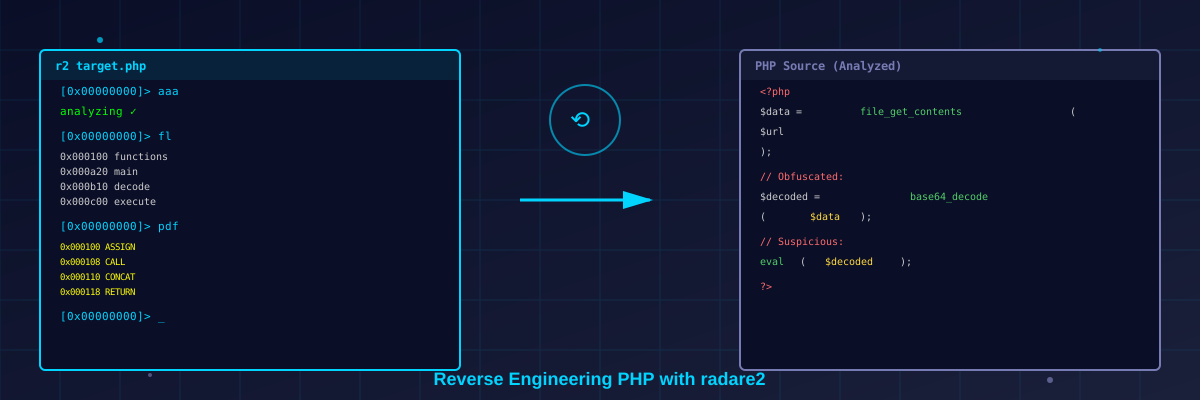
You’ll see radare2 has identified opcodes and functions. The pdf command will show the disassembled bytecode:
[0x00000000]> pdf
The output will show you the actual operations: ASSIGN, CONCAT, CALL, etc., without needing the original source. Obfuscation that works on humans (hex escapes, eval, variable indirection) becomes transparent in the bytecode.
Key radare2 Features for PHP Analysis
1. Cross-Reference Analysis
Find what calls a function, or what a function calls:
[0x00000000]> x # Show xrefs to current location
This is invaluable for understanding control flow in unfamiliar code.
2. String Extraction
Strings in opcodes are often revealing:
[0x00000000]> iz # List all strings
You’ll see what URLs are being contacted, what functions are being invoked, what messages are being used—all critical clues.
3. Comments and Annotations
You can annotate the disassembly for later review:
[0x00000000]> CC "This looks suspicious" # Add a comment
Useful when building a shared analysis or returning to work later.
4. Search and Grep
Find specific opcodes or patterns:
[0x00000000]> /x 4865 6c6c 6f   # Search for hex pattern
[0x00000000]> /a "call"          # Search assembly
This helps locate specific logic without reading the entire disassembly.
Common Patterns to Look For
When reverse engineering unknown PHP, watch for:
- Eval and dynamic execution:
eval(),assert(),create_function(),call_user_func(),preg_replace(/e). - File system access:
fopen(),file_put_contents(),include(),require(). - Network calls:
curl_init(),fsockopen(),stream_get_contents(). - Encoding tricks:
base64_decode(),gzuncompress(),unserialize(). - Reflection and introspection:
get_defined_functions(),get_class_methods(),ReflectionClass.
These opcodes are the fingerprints of potentially malicious or suspicious behavior.
Practical Workflow
Here’s a typical reverse-engineering session:
- Open the file:
r2 target.php - Analyze completely:
aaa - List functions:
fl - Identify entry points: Look for
mainor functions called early - Follow control flow: Use
pdfandxto understand what happens - Extract strings:
izfor clues about intent - Document findings: Use comments (
CC) and notes - Repeat for deeper functions: Seek to suspicious functions and drill down
Limitations and When to Escalate
radare2 handles PHP bytecode well, but:
- Encrypted or packed PHP: If the code is encrypted with tools like ionCube or Zend Guard, you’ll need to decrypt it first (or use a debugger to catch it post-decryption).
- Very large files: radare2 can handle them, but interactive analysis gets tedious; writing scripts (
r2pipe) becomes more practical. - Obfuscated control flow: Polymorphic or deliberately confusing code can still be hard to follow even in bytecode; you may need a debugger.
For these cases, consider:
- xdebug: A PHP debugger for dynamic analysis.
- Frida: Dynamic instrumentation for runtime analysis.
- Strace/ltrace: System call tracing to see what a PHP process is doing.
Ethical and Legal Notes
Reverse engineering is legal in most jurisdictions for legitimate purposes: security research, auditing your own software, academic work, and competitive analysis often have protections. That said:
- Always get authorization before analyzing software you don’t own.
- Respect licensing: Some licenses prohibit reverse engineering; check before you start.
- Responsible disclosure: If you find a vulnerability, report it privately before going public.
- Don’t distribute cracked or unlicensed code: Analysis is fine; redistribution may not be.
Final Thoughts
radare2 is a Swiss Army knife for reverse engineering, and PHP is just one of its domains. Learning to read bytecode gives you a superpower: the ability to understand code even when the source is hidden or obfuscated.
Start small. Pick a piece of PHP code you’re curious about, open it in radare2, run aaa, and explore. The bytecode won’t lie—it will tell you exactly what the code does, one opcode at a time.
Whether you’re auditing a library, analyzing a security incident, or just satisfying curiosity, radare2 and PHP bytecode analysis are skills worth adding to your toolkit.